What is G.A.M.E.?
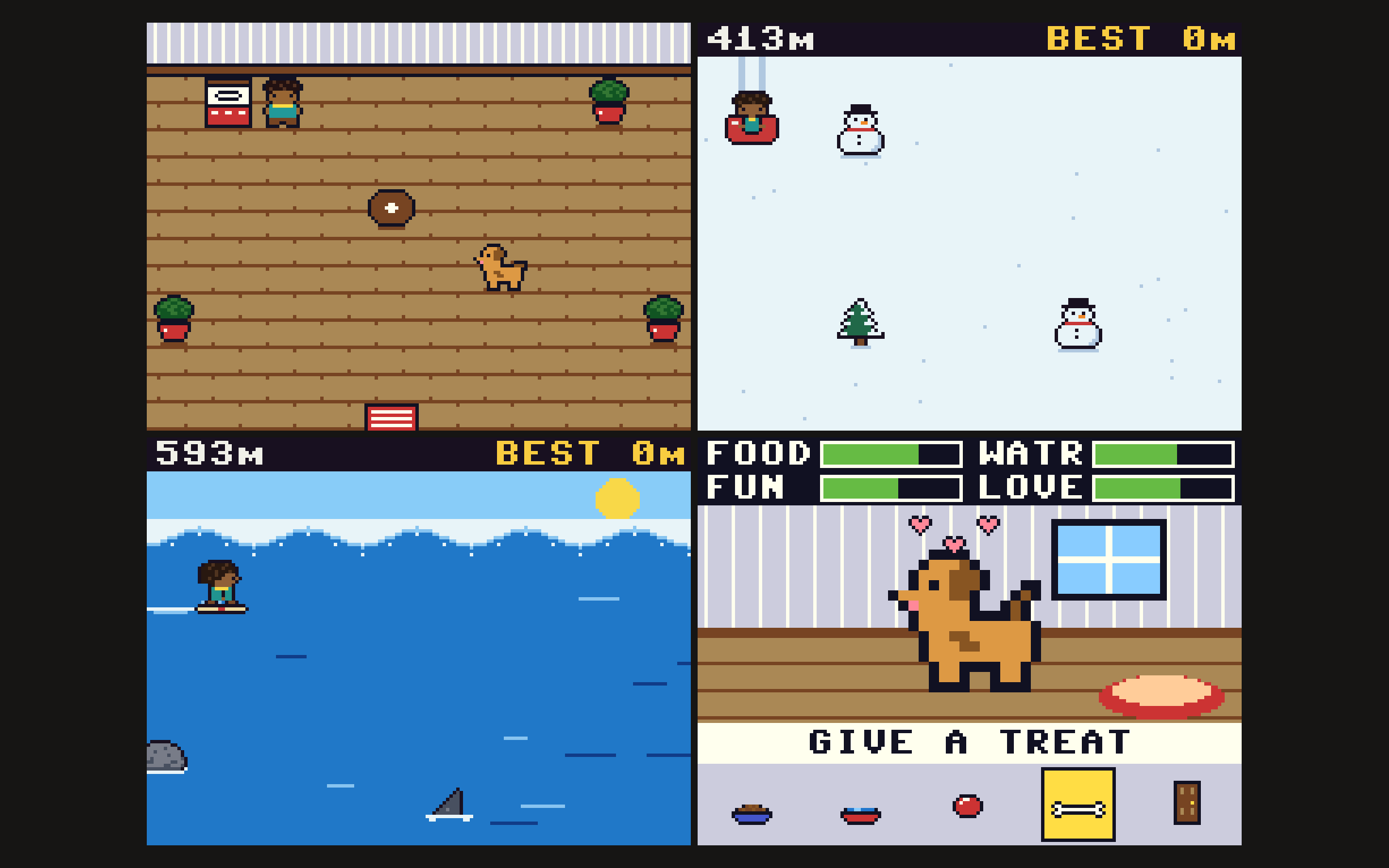
G.A.M.E. (Genuine Amusement Maker, Enjoy) is a handheld 8-bit game console built around the RP2350, the chip at the heart of the Raspberry Pi Pico 2. It plays a Game Boy–style adventure written entirely in MicroPython. You play as Troi: walk an open world, talk to townsfolk, read signs, and step up to arcade stations where each cabinet runs its own minigame.
All of it runs on a microcontroller that costs about $5, driving a 2-inch SPI LCD with eight buttons in a Game Boy layout. The project covers the whole stack: a custom 2D game engine, a rendering pipeline shaped around the chip's limits, three minigames, a desktop simulator for testing without the hardware, a custom PCB and 3D-printed button caps.
The Game
The Overworld
The world is built from 16 × 16 pixel tiles, and Troi moves tile by tile like the Game Boy Pokémon games. A quick tap turns Troi to face a direction; holding B runs.
| Area | What's there |
|---|---|
| Troi's house | Where the game starts. Juno the dog wanders around inside. |
| Bitwood Village | Troi's home town: signs, villagers, a pond, a locked door and an arcade station. |
| Arcade stations | Each has a champion to talk to and a cabinet that starts a minigame. |
| Route 1 | A winding path north with a river crossing and a second station. |
Area banners. A name banner slides in when Troi enters a new area.
Water shimmer. Water sparkles without a single tile being redrawn. The game flips one palette entry between two blues, and every water pixel changes with it.
Townsfolk. They stand still, look around, or wander near home. They never block doorways, and they turn to face Troi when spoken to. Dialogue types out in a word-wrapping text box.
The Minigames
| Minigame | What you do | Feel |
|---|---|---|
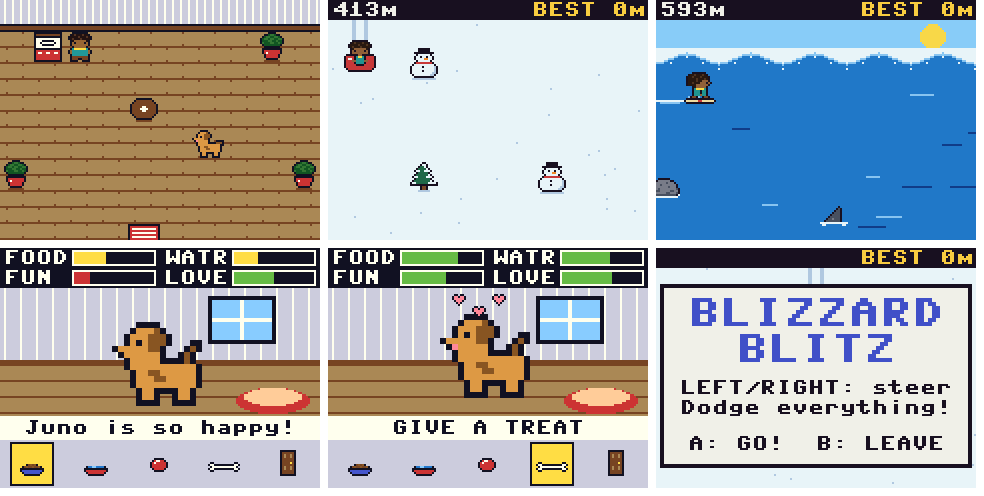
| Blizzard Blitz | Snow-tube down an endless hill across 5 lanes, dodging trees, rocks and snowmen. | Hops between lanes |
| Surf's Up | Surf an endless wave, carving up and down to dodge rocks, buoys and sharks. | Smooth, analogue-style carving |
| Juno | Look after Troi's dog: feed Juno, give water, play fetch, hand out treats. | Care sim |
The runners. Speed, row spacing and obstacles per row all increase over time. One hit ends the run, the score is distance in metres, and the best distance is saved to flash. Both runners share one obstacle engine, so the same fairness guarantee (below) holds for two different control feels.
Juno. Four needs (food, water, fun and love) drop over time, including while Troi is off exploring, and are saved between power cycles. Juno's mood shows in the tail and face: happy (tongue out, fast wag), okay, or sad (tail down). Every action is animated, from a fetch sequence with an arcing ball to treats, which are limited to three a minute.
Rendering on a Microcontroller
The display is 320 × 240 pixels. A full-screen frame buffer at 16 bits per pixel would take 150 KB of the RP2350's 520 KB of RAM, which MicroPython also needs for everything else. So the game never holds a full frame.
Instead it draws on a 160 × 120 canvas that uses one byte per pixel, as an index into a 46-colour palette. Compiled native code (MicroPython's @viper emitter) scales the canvas 2× and converts the colours, then streams it to the display in 10 KB bands. The whole pipeline needs about 29 KB.
Why a low-resolution canvas. Drawing touches 19,200 pixels instead of 76,800. It also gives the chunky Game Boy look, and it makes palette effects free: fades and the water shimmer only rewrite a few dozen look-up-table entries.
The real bottleneck is SPI bandwidth. A full 16-bit frame is 153,600 bytes. The engine can also drive the ST7789 in 12-bit RGB444 mode, which packs two pixels into 3 bytes and cuts each frame to 115,200 bytes, 25% less traffic. At 37.5 MHz that puts the transfer limit at about 40 frames per second, against about 20 at 25 MHz in 16-bit mode. An on-device benchmark measures the real numbers.
Look-up tables per colour mode. In 16-bit mode each palette entry is stored as one 32-bit word holding the colour twice, so horizontal doubling costs a single word copy, and every second screen row is a copy of the first.
No allocation in hot loops. Per-frame paths use pre-allocated buffers, memoryview slices and bit-packed button state. That keeps MicroPython's garbage collector from causing stutters mid-game.
Engine Architecture
Scenes. Every screen is a scene with two methods: update(dt) returns the next scene (or nothing, to stay), and draw(fb) draws the frame. The main loop is fixed: read buttons, update, draw, present.
Frame-rate independent. All movement and timers use real elapsed time in microseconds, so the game plays at the same speed whatever the frame rate.
The world is data. Every map lives as text in one file: tile layouts, warps between maps, sign text, NPCs and their dialogue, and which cabinet launches which game. A built-in validator checks every coordinate, catching warps that lead into walls or NPCs standing on blocked tiles.
Grid movement. Characters reserve both their source and destination tile during a step, so they can never overlap. Leftover movement carries into the next step, which keeps continuous walking smooth.
Persistence. Best distances and Juno's needs live in a small JSON file on flash, written only at natural checkpoints to limit flash wear.
Each minigame is loaded only while it is being played. Its code and graphics are imported when Troi walks up to the cabinet, and when the game ends it hands control back to the exact overworld state it came from and removes itself from memory. Repeated plays were tested and showed no memory growth.
The Fairness Rule
Endless runners have a classic failure: the random spawner builds a wall you cannot get past, and the player dies through no fault of their own. Blizzard Blitz and Surf's Up rule that out by construction.
Obstacles arrive in rows across 5 lanes. For each new row, the spawner:
1. Picks up to n lanes to block, where n grows with difficulty but is never more than 4.
2. Works out the reach: how many lanes Troi can cross in the time between two rows, from the current scroll speed, the row spacing and the lane-change time.
3. Checks that every lane open in the previous row has an open lane within reach in the new row. If one doesn't, it clears the blocked lane closest to it and checks again.
Row spacing is never allowed to shrink below the distance needed to cross at least one lane. So however fast the game gets, a player who survived the last row can always survive the next. A stress test of 60,000 generated rows found zero rows blocking all 5 lanes and zero dead ends.
Testing Without the Hardware
Most of the game was written before the hardware was on the bench, so it was tested in a desktop simulator.
The real code, unchanged. The unmodified game runs on MicroPython's Unix port. A mocked machine module records every GPIO and SPI transaction.
An emulated display. A software ST7789 interprets the command and data stream (CASET, RASET, RAMWR, COLMOD, MADCTL) and decodes 16-bit and 12-bit pixel data back into images. Tests check that every screen pixel matches the palette colour of its canvas pixel.
Scripted playthroughs walk through doors, read signs, talk to NPCs, test collisions, confirm that running beats walking, and launch every minigame from its cabinet. Bot players play the obstacle games for minutes at a time.
Memory tests play games repeatedly and check that memory returns to its baseline, under a heap capped at the Pico's size. Every file is also cross-compiled for the Cortex-M33 (mpy-cross -march=armv7emsp) to catch errors before deploying.
Three tools handle bring-up on the real device:
| Tool | What it does |
|---|---|
| diagnose.py | Checks every file is present and complete, tests the display at safe settings and then at game settings, and checks every module loads. |
| button_test.py | Draws a controller on screen that lights up each button as it's pressed, and logs each press. |
| benchmark.py | Runs the overworld on autopilot at several SPI speeds and colour modes, and reports frames per second with a per-frame breakdown (logic, draw, scale, SPI). |
The Hardware
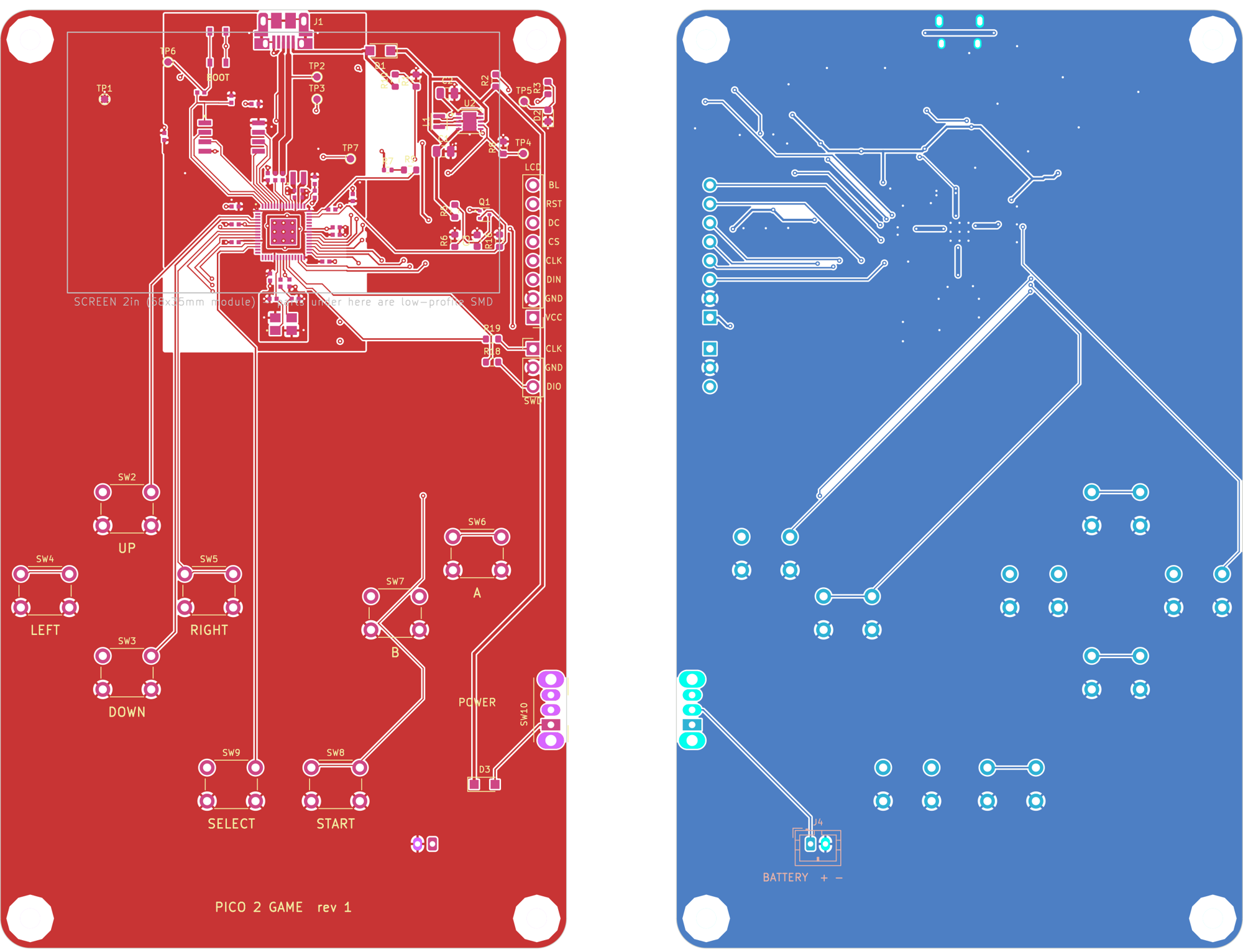
The game was developed on a Raspberry Pi Pico 2 with the display and buttons wired to it. The rev 1 board puts the Pico 2 circuit directly onto a 76 × 126 mm, two-layer, 1.6 mm board alongside the buttons, the display and SWD headers, a power switch and a battery connector. It keeps the same pin assignments, so the game runs on it unchanged.
| Block | Part | Role |
|---|---|---|
| Microcontroller | RP2350A (QFN-60) | Dual Cortex-M33 at 150 MHz, 520 KB SRAM |
| Flash | W25Q32JV | 4 MB for MicroPython, the game and the save file |
| Power | TPS63001 buck-boost | Steady 3.3 V from USB, 3×AAA or a protected 1-cell LiPo |
| Power path | PMEG6010 Schottky diodes | Join USB and battery, so USB never back-feeds the pack |
| Clock | 12 MHz crystal | RP2350 reference clock |
| Display | 2.0" IPS, ST7789, 8-pin JST PH header | 240 × 320 panel, used in landscape over SPI0 |
| Controls | 8 × 6 mm tactile switches | D-pad, A, B, START, SELECT; internal pull-ups, no resistors |
| Debug | SWD header, BOOTSEL button | Programming and recovery |
| Signal | GPIO |
|---|---|
| Display DIN / CLK / CS | GP19 / GP18 / GP17 |
| Display DC / RST / BL | GP20 / GP21 / GP22 |
| UP / DOWN / LEFT / RIGHT | GP2 / GP3 / GP4 / GP5 |
| A / B / START / SELECT | GP6 / GP7 / GP8 / GP9 |
The layout around the RP2350 (regulator, decoupling, crystal, flash, USB and GPIO fan-out) is adapted from Raspberry Pi's "RP2350 minimal" KiCad reference design, with drills widened to 0.3 mm. The board passes ERC and DRC with zero errors, and needs 5 mil track and gap, which is standard at JLCPCB and PCBWay.
Buttons and Case
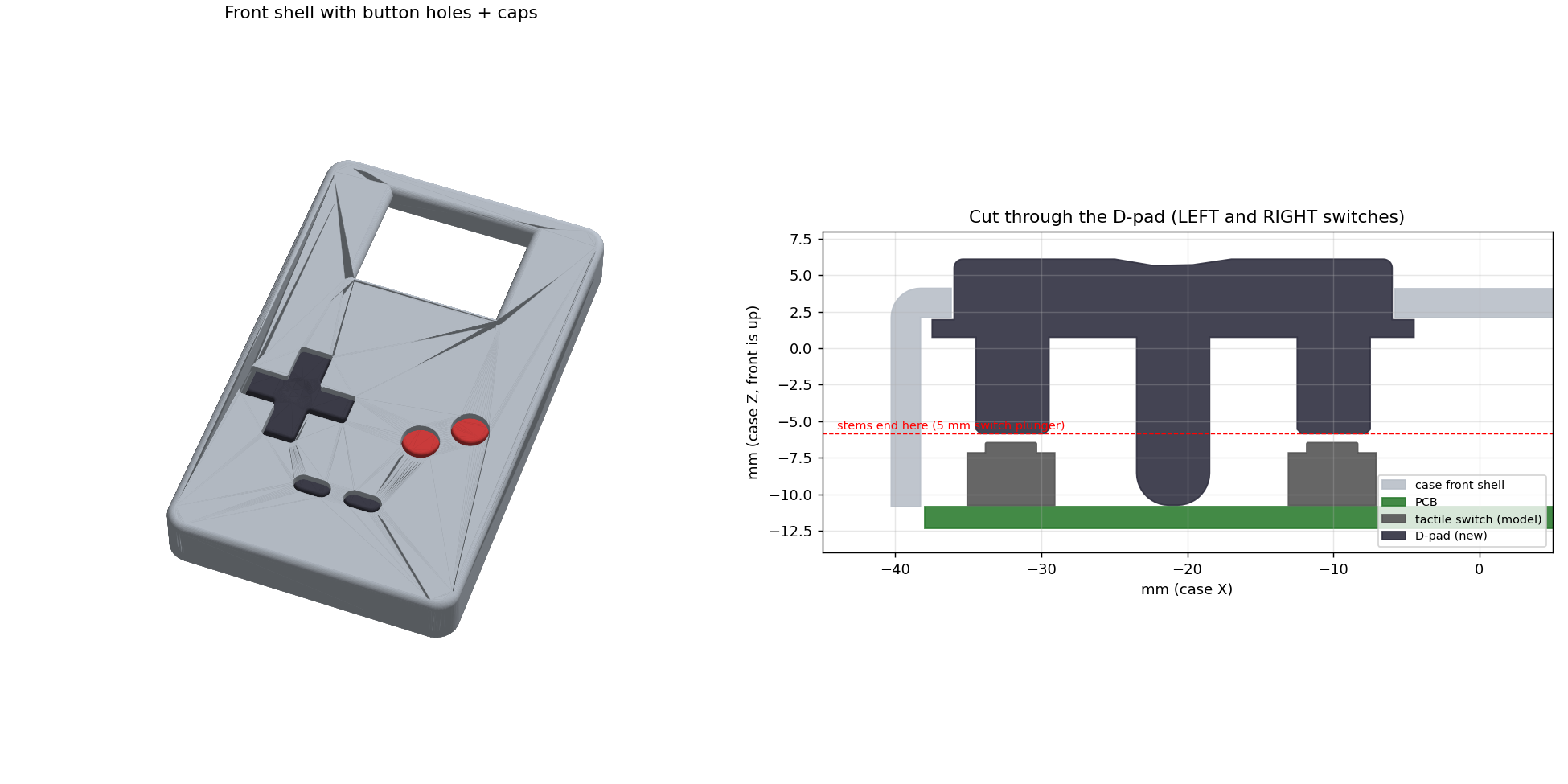
The button caps are generated in code (CadQuery) to fit the case exactly. The D-pad is a 30 mm cross that rocks on a centre pivot, so one arm presses one switch and pressing the middle presses none. A and B are 10 mm rounds, and START and SELECT are pills. Each hole is 0.2 mm larger than its cap, and a flange under the front wall keeps the caps from falling out. They print face-down with no supports.
Current Status
The game is complete and playable: the overworld, all three minigames and saving work. Rev 1 of the board is finished in KiCad, ERC and DRC clean, with Gerbers, a BOM and placement files ready for factory assembly. The button caps and case are designed and ready to print.
What's Next
1. Battery power: a single-cell LiPo with charging on the PCB.
2. Token progression: beat a station champion's score to earn a token, and spend tokens to unlock new areas.
3. Measure the frame rate on hardware, and add DMA double-buffering if it's needed.
4. More stations and minigames.
5. Sound from a PWM buzzer.
Credits
Game design, hardware and PCB design by Trammell Montgomery. Code developed with AI pair-programming assistance (Claude by Anthropic).
The RP2350 circuit layout is adapted from Raspberry Pi's RP2350 minimal design, used under the MIT License.